
Xero integration
A CRM that works with Xero
Your accountant lives in Xero. Your team lives in quotes, jobs and customer emails. Beagle CRM sits on the sales side and hands Xero exactly what it needs: issued invoices and credit notes, under the same numbers, against the right contact.
When a customer pays and you record it in Xero, Beagle knows within the hour.
14-day free trial with every feature. No card required.
The problem
Why CRM-to-accounts usually goes wrong
-
Every invoice is typed twice.
Once to send it, once into the ledger. Two copies mean two chances to get a line or a VAT rate wrong.
-
Numbers don't match.
The invoice the customer holds says one number and the ledger says another, so reconciling becomes detective work.
-
Sales can't see who's paid.
The payment lands in the bank and in Xero, but the person about to chase the customer is looking at the CRM, which still says unpaid.
-
"Two-way sync" that isn't.
Integrations that promise everything often copy contacts back and forth until you have three versions of the same customer.
Beagle to Xero
Issued invoices and credit notes, same numbers
An invoice is sent to Xero automatically the moment it's issued: when it's sent, or recorded as part-paid, paid or overdue. Credit notes go across when they're issued.
They post as approved documents, never drafts, under the same invoice or credit note number you see in Beagle. If Xero already holds that number, Beagle links to the existing Xero document instead of creating a duplicate.
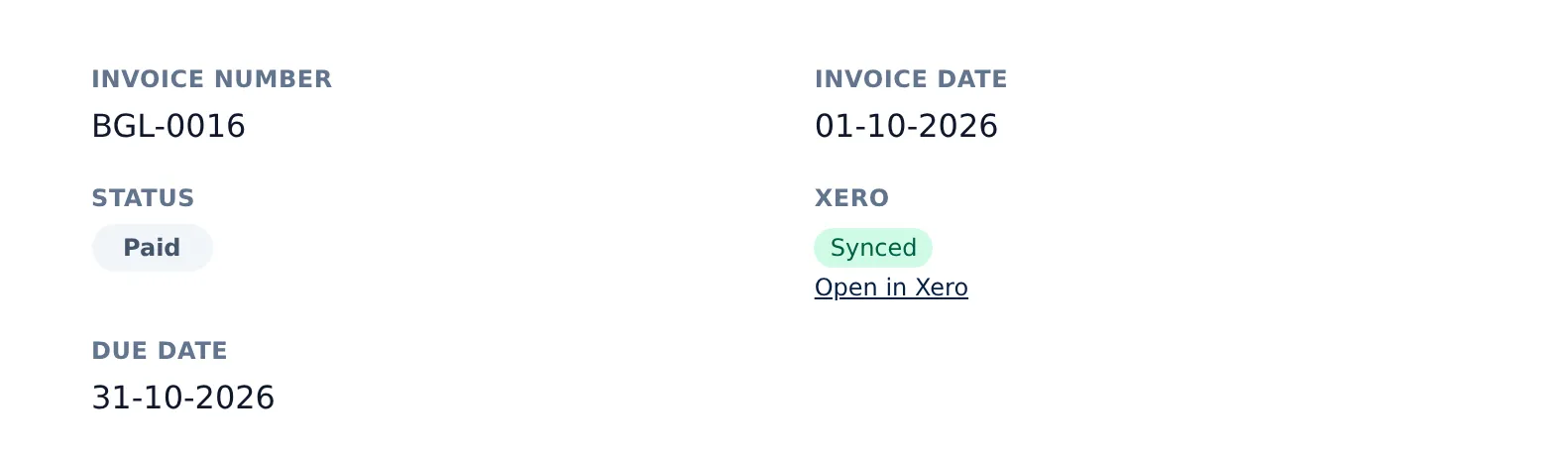
Each invoice in Beagle shows its Xero status, whether queued, synced or needing attention, and links straight to the document in Xero. A Send to Xero button pushes anything by hand.
Contacts
Matched, not merged on a guess
-
Exact matches only.
When an invoice goes across, Beagle looks for the customer in Xero by exact email, then exact name. With no match, it creates the contact from the name, email, address and phone numbers you hold.
-
Linked once, used every time.
After the first invoice, every later invoice for that customer uses the same Xero contact.
-
Your Xero contacts are left alone.
Beagle doesn't import or overwrite them. Xero stays the source of truth for the books; Beagle stays the source of truth for the relationship.
Xero to Beagle
Payments come back every hour
Payments you record in Xero, whether from bank reconciliation or entered by hand, come back to the Beagle invoice every hour. The invoice moves to part-paid or paid, the online pay link is withdrawn once it's settled, and the audit trail notes that the payment came from Xero.
Beagle never edits or deletes a payment you've already recorded. Anything unusual, like an overpayment or an invoice voided in Xero, is flagged for review rather than applied.
Set up once
Three choices, made by an admin
-
Connect.
An organisation admin signs in to Xero and picks the Xero organisation to link. Each Beagle organisation connects to one Xero organisation.
-
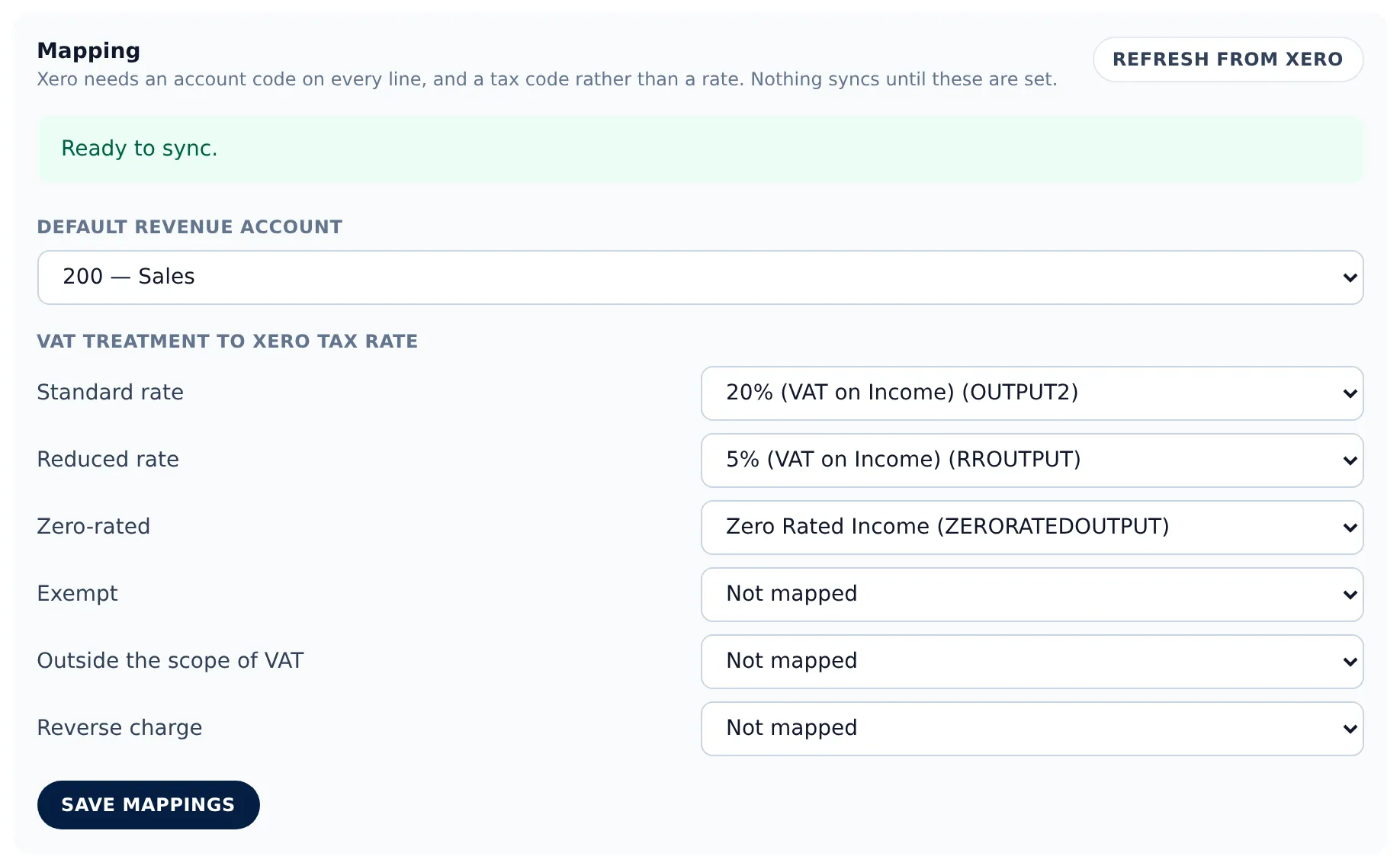
Choose a sales account.
The revenue account that invoice lines post to, picked from your Xero file.
-
Map your VAT treatments.
Match each VAT treatment you actually use, such as standard, reduced or zero-rated, to a Xero tax rate. If a treatment isn't mapped, the sync stops and tells you what to fix, instead of guessing a tax rate into your VAT return. Managers can retry a stuck document; everyone else can see its status.
Clear edges
What it deliberately doesn't do
Quotes and sales orders stay in Beagle, so Xero only sees what has been invoiced. Edits to an invoice after it's issued aren't re-sent: correct it with a credit note, the way your accountant would want.
Bank feeds, bills and purchase orders belong in Xero, and Beagle leaves them there. Invoices are posted in your Xero base currency, and there's no per-product account or tracking-category mapping yet. Invoices issued before you connect aren't backfilled; the sync starts from the day you connect.
In practice
A week with Beagle and Xero
-
Monday: the quote is won.
A quote for an office fit-out is marked won in Beagle, which raises the sales order.
-
Thursday: the job is invoiced.
The work is done, the order becomes an invoice and it's emailed to the customer. Moments later it appears in Xero as an approved invoice with the same number, against the right contact.
-
The next week: the customer pays.
They pay by bank transfer and your bookkeeper reconciles it in Xero. By the next hourly check, the Beagle invoice shows paid, so nobody chases a customer who has already settled.
-
A line was wrong.
You raise a credit note in Beagle, and it lands in Xero too.
Pricing
One plan, every feature
£29 per user per month, or £290 per user per year (two months free)
The Xero connection is included in the one plan, with no add-on fee.
All prices exclude VAT.
Questions, answered
Frequently asked questions
- Which Beagle documents are sent to Xero?
- Issued sales invoices and credit notes. They're posted as approved documents under the same number you see in Beagle. Drafts, quotes and sales orders are never sent.
- Do payments sync both ways?
- Payments come from Xero to Beagle every hour, so an invoice you reconcile in Xero shows as paid in Beagle. Beagle doesn't send payments to Xero; record them where you reconcile.
- Will it create duplicate contacts in Xero?
- No. Beagle matches an existing Xero contact by exact email, then exact name, and only creates a new one when neither matches. Once linked, the same contact is used every time.
- What happens if a VAT rate isn't mapped?
- The invoice isn't sent. It's marked as needing setup, with a message saying which VAT treatment to map, so nothing is posted to your VAT return on a guess.
- Who can connect Beagle to Xero?
- An organisation admin connects, disconnects and sets up the mappings. Managers can retry a document that failed to sync.
- Does it cost extra?
- No. The Xero connection is included in every Beagle CRM subscription.
Related
- Quotes, invoices & CRM Quote, win, invoice and get paid without re-keying a line. Beagle CRM links every UK quote, sales order and VAT invoice to the customer who asked for it.
- CRM for small businesses One CRM for a small UK team: leads, customers, quotes, VAT invoices, a shared inbox and a service desk. £29 per user, every feature, 14-day free trial.
- VAT invoicing Invoice with VAT set per line, your VAT number on each PDF, card pay links, part payments, credit notes and CSV exports. Built for UK small businesses.
Keep sales in Beagle and the books in Xero
Start a 14-day free trial with every feature and no card required, or book a demo and we'll walk through the connection with you.