
Lead management
Lead management software that keeps every deal moving
A lead is only worth something if someone does the next thing on time. Beagle CRM gives each enquiry an owner, a value, a stage and a dated next step, then puts them all on one board your team can work from.
When a deal starts to stall, the record says so. No next step booked, a follow-up gone overdue, a quote that never went out: each one lowers the lead's health score and shows up where you'll see it.
14-day free trial with every feature. No card required.
Why leads slip
Where small teams lose deals
-
Nobody owns the follow-up.
An enquiry is everyone's job for a day, then nobody's.
-
The next step lives in someone's head.
"I'll ring them next week" isn't written anywhere the rest of the team can check.
-
You can't see what's stuck.
A deal that hasn't moved in a month looks the same as one that moved yesterday.
-
Lost work teaches you nothing.
When a job goes elsewhere, the reason is never written down, so the same thing happens again.
What's in it
Everything a lead needs, on one record
-
A dated next step on every open lead
Pick the type of action (call, site visit, pricing discussion and more) and a due date. An open lead can't be saved without one, and overdue ones turn red in the list.
How next steps work -
A pipeline board you can drag
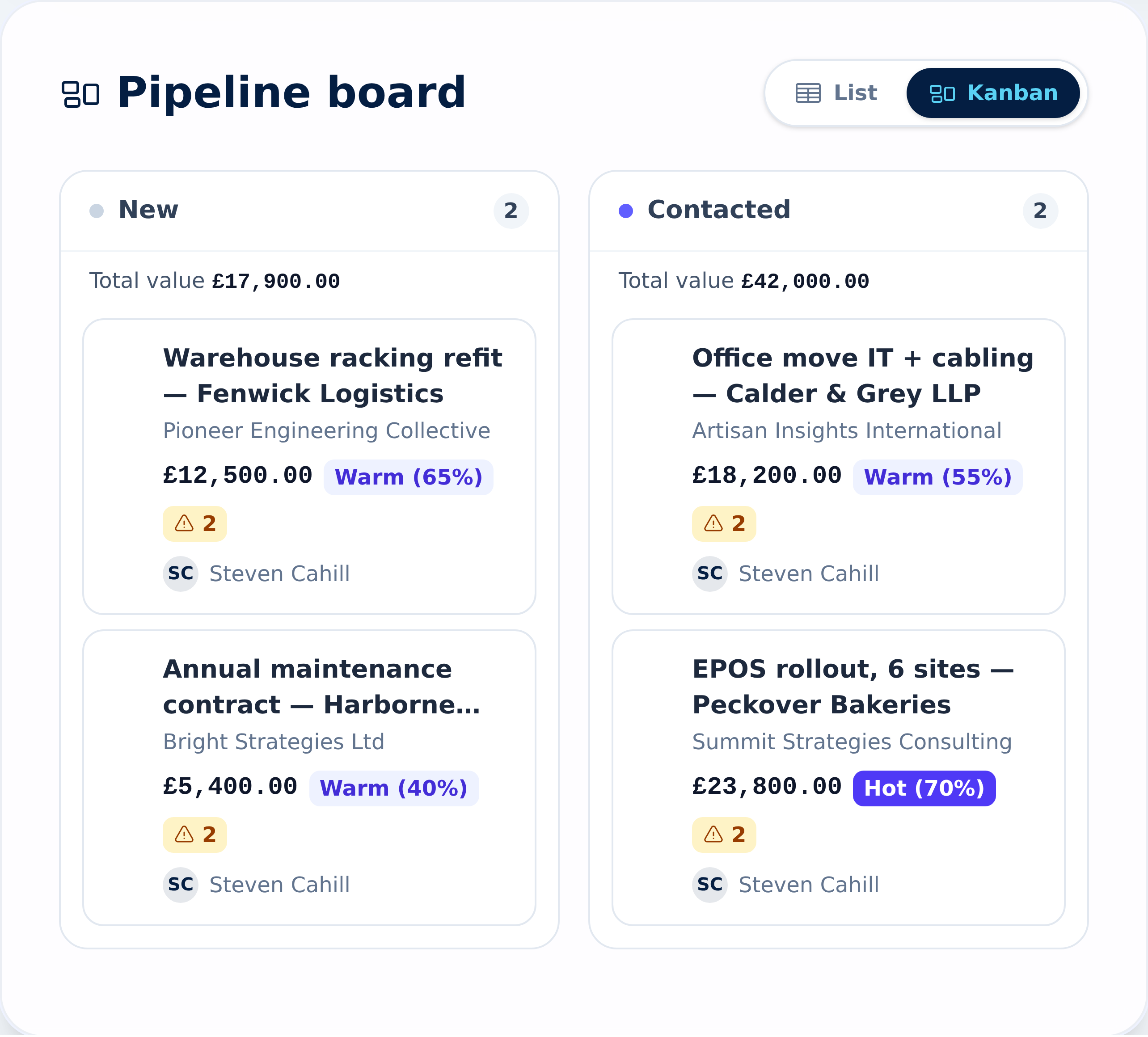
One column per stage, with a count and a total value at the top of each. Drag a card to move the deal on; collapse the columns you don't need.
How the pipeline board works -
Stages and sources you choose
Rename stages, add your own, set a confidence probability for each, and keep a list of lead sources that matches how work reaches you.
Setting up stages and sources -
Potential and health, side by side
Your own Cold, Warm or Hot judgement next to a health score Beagle works out from what's missing or late.
How potential and health work -
Filters that find the problems
Show only your leads, only overdue ones, only leads in poor health, or by stage, potential, campaign or tag. Sort any column.
Filtering and sorting leads -
Follow-up tasks that keep in step
With the automation switched on, a new lead gets a task due on its next-step date, and the task moves when the date does. Leads that sit idle for too long get a reminder task too.
How lead automations work -
Honest win and loss records
Closing a lead as lost asks for a reason, and you can record which competitor took the work.
How competitor tracking works -
Import from Excel
Download the lead template, fill it in and upload it. You see every row checked before anything is saved.
Importing leads
How it works
One enquiry, start to finish
A commercial cleaning firm gets a call from an office manager who wants a quote for weekday cleaning across two floors. Here is that enquiry in Beagle CRM.
-
The call becomes a lead.
The office logs it against the customer (or adds the customer from the same form), with source Inbound Call, an estimated annual contract value of £18,000, potential at 60% (Warm) and a site visit due on Thursday to survey the building.
-
The survey gets a task.
If the follow-up automation is on, a task appears for the lead's owner, due on Thursday. If the office manager moves the survey to Friday, change the date on the lead and the task follows.
-
The quote is raised from the lead.
With the floor areas measured, Create Quotation opens a quote with the lead attached. The lead moves to Quotation Created by itself, then to Quotation Sent once the quote goes out.
-
The board shows where it stands.
The client asks whether three visits a week instead of five would bring the price down, so the owner drags the card to In Negotiation and books a pricing discussion for Tuesday.
-
The deal closes either way.
If the client accepts the revised quote, the lead moves to Won and the contract work can begin. If they stay with their current cleaner, the owner marks it Lost, picks a reason such as Price, and records that competitor. Either way the open next step and its date are cleared, so the lead stops asking for attention.
How the health score works
A score that tells you what to fix
Every open lead starts at 100%. Points come off for each gap Beagle finds:
- a missing or overdue next step,
- a quote that was created but never sent, or sent with no follow-up booked,
- no estimated value, expected close date, source detail or primary contact,
- a lead still at New or Contacted that hasn't been qualified,
- a lead that has sat in the same stage for 14 days or more, unless its next step or close date is still in the future.
Below 80% a lead needs attention; below 50% it's in poor health. Hover over the warning on a board card to see each issue by name. The score is a checklist, not a prediction: it says what's missing, not whether the customer will buy.
What it doesn't do
The honest edges
- No automatic or AI scoring. Potential is your team's judgement; the health score counts gaps on the record. Neither guesses who will buy.
- No website enquiry form. Beagle doesn't give you a form to embed on your site. Leads are added in the app, imported from Excel, or created through the API.
- Every lead belongs to a customer. You add the customer first, or from the lead form. The import matches each row to a customer that already exists, by email or name.
- No duplicate check on leads. Duplicate finding and merging covers customers and contacts, not leads.
- No saved views on the lead list. Filters and sorting stay in the page address, so you can bookmark a view, but you can't save and name one inside Beagle yet.
- Won and Lost are fixed. You can rename and add the stages in between, but every pipeline ends with those two.
Pricing
One plan, every feature
£29 per user per month, or £290 per user per year (two months free)
Leads, the pipeline board, automations and import are all in the one plan.
All prices exclude VAT.
Questions, answered
Frequently asked questions
- Does Beagle CRM have a sales pipeline board?
- Yes. Leads appear on a board with one column per stage, showing how many deals are in each and their total value. Drag a card to another column to change its stage.
- Can we use our own pipeline stages and lead sources?
- Yes. An admin can rename stages, add new ones and give each a confidence probability (an indicator only; forecasts count deals at full value), and can edit the list of lead sources and next-step types. Won and Lost are always the final two stages.
- Does Beagle CRM score leads automatically?
- No. There is no AI or automatic lead scoring. Each lead carries two figures instead. Potential is a percentage your team sets by hand, shown as Cold (up to 33%), Warm (up to 66%) or Hot. The health score is calculated: every open lead starts at 100% and loses points for each gap, such as an overdue next step, an unsent quote or a missing value. It tells you what to fix, not who will buy.
- Do we have to set a next step on every lead?
- Yes, for open leads. Each one needs a next-step date before it can be saved, so nothing sits in the pipeline without a plan. Won and lost leads don't need one, and closing a lead clears it.
- Can we import our existing leads?
- Yes. Download the Excel template from the leads page, add one row per lead and upload it. Each row is matched to an existing customer by email or name and checked before import, and you can download any rows that failed so you can fix them.
- Can we record why we lost a deal?
- Yes. Marking a lead as lost asks for a reason, such as price, timing or a competitor, and you can add notes and pick the competitor who won it. Win and loss figures per competitor appear on the competitor's record.
Related
- CRM for small businesses One CRM for a small UK team: leads, customers, quotes, VAT invoices, a shared inbox and a service desk. £29 per user, every feature, 14-day free trial.
- Quotes, invoices & CRM Quote, win, invoice and get paid without re-keying a line. Beagle CRM links every UK quote, sales order and VAT invoice to the customer who asked for it.
- Shared inbox CRM One team inbox for sales@ and support@, with every email linked to the customer who sent it. Reply from your own mailbox; support email becomes a case.
- Quoting software Build quotes from your catalogue, discount any line, email a PDF with your logo and see when the customer opens it. Quoting software for UK businesses.
- CRM reporting See pipeline, revenue, aged debt, product margins and a 12-month sales forecast on one reports page, with CSV exports. £29 per user, 14-day free trial.
- Ask Oscar AI search Ask your CRM in plain English. Oscar searches on Beagle's own server, shows only records you may open and links every source. 14-day free trial.
Put every open deal on one board
Start a 14-day free trial with every feature and no card required, or book a demo and we'll set up your pipeline stages with you.