
Recurring billing
Recurring invoicing for UK businesses that bill the same customers every cycle
Some customers pay you every month. Others pay once a year, on the anniversary of a contract that nobody in the office remembers until the money fails to arrive. Either way, the invoice is the same as last time apart from the date and the number.
Beagle CRM lets you set that invoice up once as a series. On each due date it raises the next one for you, numbered in your normal sequence, with the dates moved on and the lines carried over. You choose whether it waits as a draft for you to check, or goes straight to the customer.
14-day free trial with every feature. No card required.
The problem
Why repeat invoices slip
-
The renewal lives in someone's head.
Annual contracts are easy to forget because they come round so rarely. A missed one is income you have already earned and never billed.
-
Copying last year's invoice by hand.
Each cycle starts from an old PDF or a spreadsheet row, and an old price or a stale date slips through.
-
No clear end.
A fixed-term contract keeps being billed after it finishes because nothing marks where the series should stop.
-
One-off and contract income look the same.
Without a split you can't see how much of next month is already secured.
What's included
How a repeating invoice works
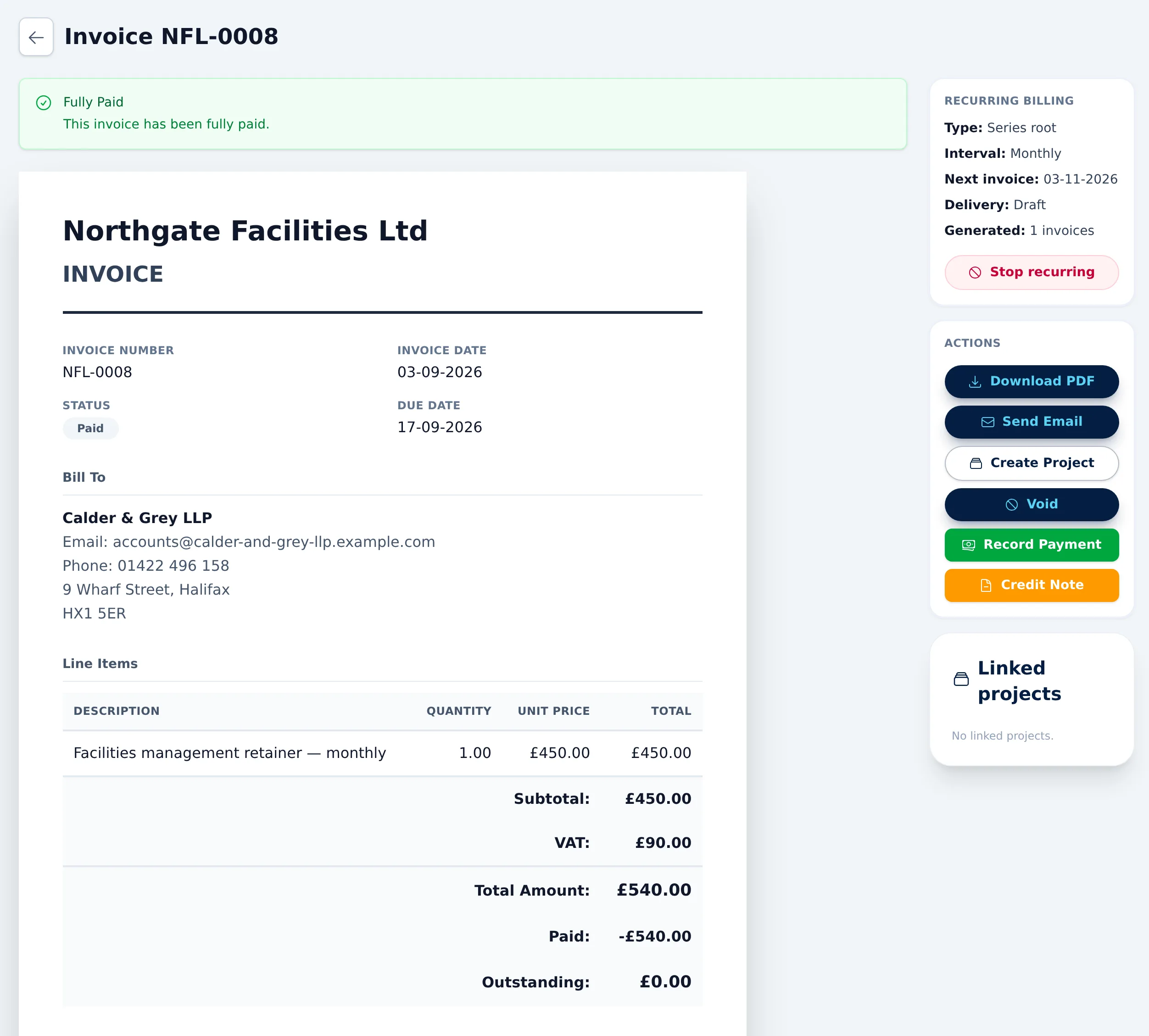
-
Set up from a normal invoice
Build the first invoice as usual, then switch on recurring billing while it is still a draft. That invoice becomes the start of the series.
Making an invoice recurring -
Four intervals
Repeat daily, weekly, monthly or yearly. Pick the date of the next invoice and the series runs on from there. A monthly series started on the 31st lands on 29 February in a leap year and goes back to the 31st in March.
Choosing an interval -
Draft or automatic
Leave each new invoice as a draft so someone can look it over before sending. Or tick automatic sending: the invoice is issued as sent, with its VAT position recorded, its first reminder scheduled and a copy posted to Xero if you use it, then emailed to the customer.
Draft versus automatic sending -
An end you set in advance
Give the series an end date, a maximum number of future invoices, or both. When it reaches either, it stops and switches itself off. Leave both blank to run until you stop it.
Ending a series -
Fresh number, fresh dates
Every repeat takes the next number in your invoice sequence. Its invoice date is the scheduled date, and its due date keeps the same gap as the first invoice, so 30-day terms stay 30-day terms.
Invoice numbering and terms -
Lines carried over exactly
Descriptions, quantities, prices, line discounts and VAT rates are copied from the first invoice, along with the customer's PO reference and your notes.
What each repeat copies -
Pay links and reminders as normal
Once a repeat is sent it is an ordinary invoice. If you have connected Stripe, the email carries a card pay link, and your reminder settings apply to it like any other.
Card pay links on repeats -
One click to stop
The first invoice in a series has a Stop recurring button. Nothing further is raised, and invoices already issued are left alone.
Stopping a series -
Contract income in your reports
The reports page splits paid revenue into recurring and one-off for each month, net of VAT, so you can see what the contracts bring in.
Recurring revenue on reports
How it works
One service contract, year after year
A fire-safety firm services extinguishers and alarm panels for offices, schools and small warehouses. Most of its clients are on an annual service contract. Here is one of them in Beagle CRM.
-
Raise the first invoice.
A new client signs a three-year annual contract for extinguisher servicing. The office manager raises this year's invoice with one line per site and a line for the call-out, all at the standard VAT rate.
-
Make it a series.
While the invoice is still a draft, they open it, switch on recurring billing, choose Yearly, and set the next invoice date to the same day next year. They enter 2 as the maximum number of future invoices, because this first invoice covers year one.
-
Keep it as a draft each year.
Engineers sometimes add or remove an extinguisher at a site, so the office leaves automatic sending off. Each year's invoice should be checked against the last service sheet before it goes.
-
Send year one.
They send the first invoice. It is emailed with the PDF and, because the firm takes card payments through Stripe, a pay link. The client's reminder schedule starts from here.
-
The renewal raises itself.
On the anniversary, a new draft appears with the next invoice number, this year's date and a due date 30 days later. The client's record shows when it was created.
-
Adjust, then send.
The site added two units this year. The office manager edits the draft to change the quantity and sends it. Only this year's invoice changes; the series keeps the original lines for next time.
-
The contract runs out.
After the third invoice, the series has raised its two future invoices and switches itself off. If the client renews, the office starts a new series from that year's invoice.
What it doesn't do
Know the limits before you set one up
Recurring billing repeats an invoice you have already written. It is not a subscription engine.
- Four intervals only. Daily, weekly, monthly or yearly. There is no quarterly, fortnightly or custom gap yet.
- The series is fixed once the first invoice is sent. Lines, interval and dates can be changed only while the first invoice is a draft. After that, change an individual repeat while it is a draft, or stop the series and start a new one at the new price.
- No pause. You can stop a series but not suspend it for a few months. A stopped series whose first invoice has been sent can't be switched back on either, so treat stopping as final.
- No automatic card collection. Beagle doesn't store card details or take payment on a schedule, and there is no Direct Debit. Each invoice carries a pay link the customer uses.
- Billing details come from the first invoice. The customer's name and address on each repeat are copied from the first invoice. If a client moves, start a new series.
- No list of a series' invoices. The first invoice shows how many repeats it has raised, and each repeat links back to it, but there is no single view of the whole series.
Pricing
One plan, every feature
£29 per user per month, or £290 per user per year (two months free)
Recurring billing is part of the one plan, alongside quotes, invoices and card payments. Every feature is included and there are no add-ons.
All prices exclude VAT.
Questions, answered
Frequently asked questions
- How often can an invoice repeat?
- Daily, weekly, monthly or yearly. You set the date of the next invoice and the series carries on at that interval. Monthly and yearly series keep their day of the month, so one started on the 31st goes to 29 February in a leap year and back to the 31st in March.
- Do repeat invoices go out on their own?
- Only if you choose that. Tick automatic sending and each new invoice is issued and emailed to the customer on the day it is raised, with its first reminder scheduled and a copy sent to Xero if you use it. Leave it unticked and each one waits as a draft for you to check and send.
- Can I change the price part way through a contract?
- You can edit any repeat while it is still a draft, which changes that invoice only. To change the price for every future invoice, stop the series and start a new one from an invoice at the new price.
- How do I end a series?
- Set an end date or a maximum number of future invoices when you create it, and it stops by itself. You can also press Stop recurring on the first invoice at any time. Invoices already issued are not affected.
- Can customers pay a repeat invoice by card?
- Yes, if you connect your own Stripe account. Each sent invoice includes a link to pay the balance by card, and the invoice is marked paid when the payment clears.
- Does Beagle CRM take payment automatically, like a subscription?
- No. Beagle raises and sends the invoice; it does not hold card details or run Direct Debits. The customer pays from the link in the email, or by any method you record.
Related
- VAT invoicing Invoice with VAT set per line, your VAT number on each PDF, card pay links, part payments, credit notes and CSV exports. Built for UK small businesses.
- Quotes, invoices & CRM Quote, win, invoice and get paid without re-keying a line. Beagle CRM links every UK quote, sales order and VAT invoice to the customer who asked for it.
- CRM for service businesses Win the work, deliver it as a project and support the customer after, in one CRM. Service desk with SLA clocks, customer project portals and time logging.
- CRM with Xero Quote and invoice in Beagle CRM; issued invoices and credit notes post to Xero under the same number, and Xero payments flow back every hour.
- CRM for small businesses One CRM for a small UK team: leads, customers, quotes, VAT invoices, a shared inbox and a service desk. £29 per user, every feature, 14-day free trial.
- Customer portal Let clients follow their project, approve work, upload files, accept quotes and reply to support cases in a portal with your logo. No passwords to manage.
- CRM reporting See pipeline, revenue, aged debt, product margins and a 12-month sales forecast on one reports page, with CSV exports. £29 per user, 14-day free trial.
Set up the invoice once and let the calendar do the rest
Try every feature free for 14 days with no card, or book a demo and we'll set up one of your contracts with you.