
Service desk
Service desk software for UK small businesses
A customer reporting a problem wants three things: to know someone has it, to know when they'll hear back, and not to explain it twice. Beagle CRM gives every problem a case with its own reference, a priority, a category and a named owner, and keeps the whole conversation on it.
Switch on service targets and each case also carries a response clock and a resolution clock that only count your working hours, warn you before a deadline slips, and stop while you are waiting on the customer.
14-day free trial with every feature. No card required.
The problem
Why support requests go missing
-
Problems arrive everywhere and live nowhere.
A phone call, a forwarded email and a message to someone's personal inbox all describe the same fault, and none of them is a record anyone else can find.
-
"Who's dealing with this?" has no answer.
Without an owner on each request, everyone assumes someone else has replied.
-
Deadlines are counted on the wall clock.
A promise to respond within four hours means nothing if Friday evening and the bank holiday count against you.
-
Waiting on the customer looks like doing nothing.
If the clock keeps running while you wait for a photo or an access date, your figures punish you for their silence.
What's included
What a Beagle case holds
-
A reference for every case
Each case is numbered in its own sequence for your organisation, such as CS-00042, and the number goes into the subject line of every email about it. Search by number, subject or customer name from anywhere in the app.
How case numbers work -
Priority, category and owner
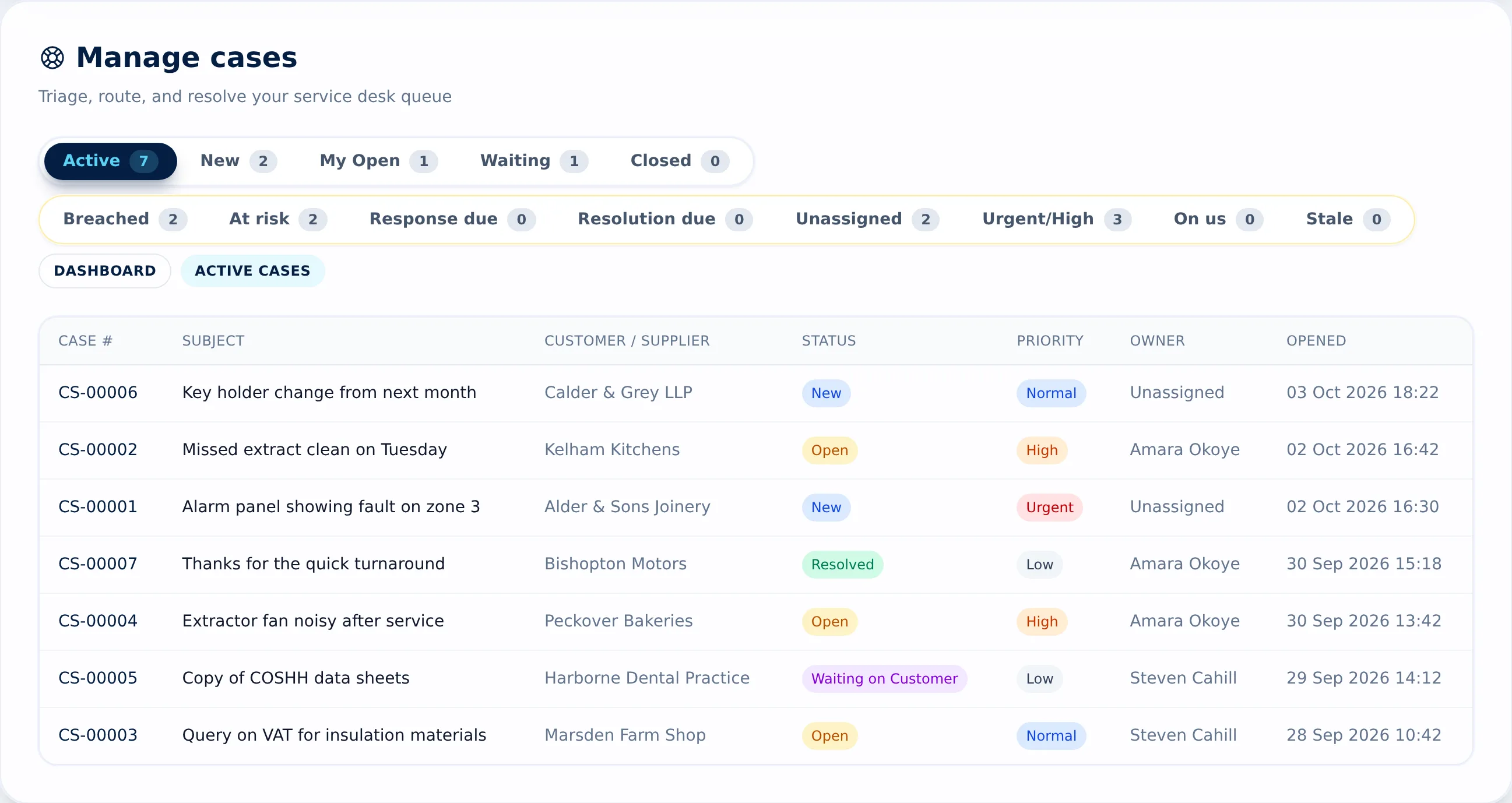
Four priorities from Low to Urgent. Ten starter categories that an admin can rename, add to, deactivate or reorder, with one set as the default. Assign an owner, and they're notified when a case is handed to them.
Setting priorities and categories -
Statuses that say whose move it is
New, Open, Waiting on Customer, Waiting on Internal, Resolved and Closed. Replying to the customer moves the case to Waiting on Customer by itself; their answer moves it back to Waiting on Internal.
Case statuses explained -
Internal notes and customer replies
Write a note for the team, or a customer reply that is emailed from your support mailbox. The customer answers from their own inbox and the answer lands on the case. Copy in extra contacts and each one gets their own email.
Replying to customers -
Service targets in business hours
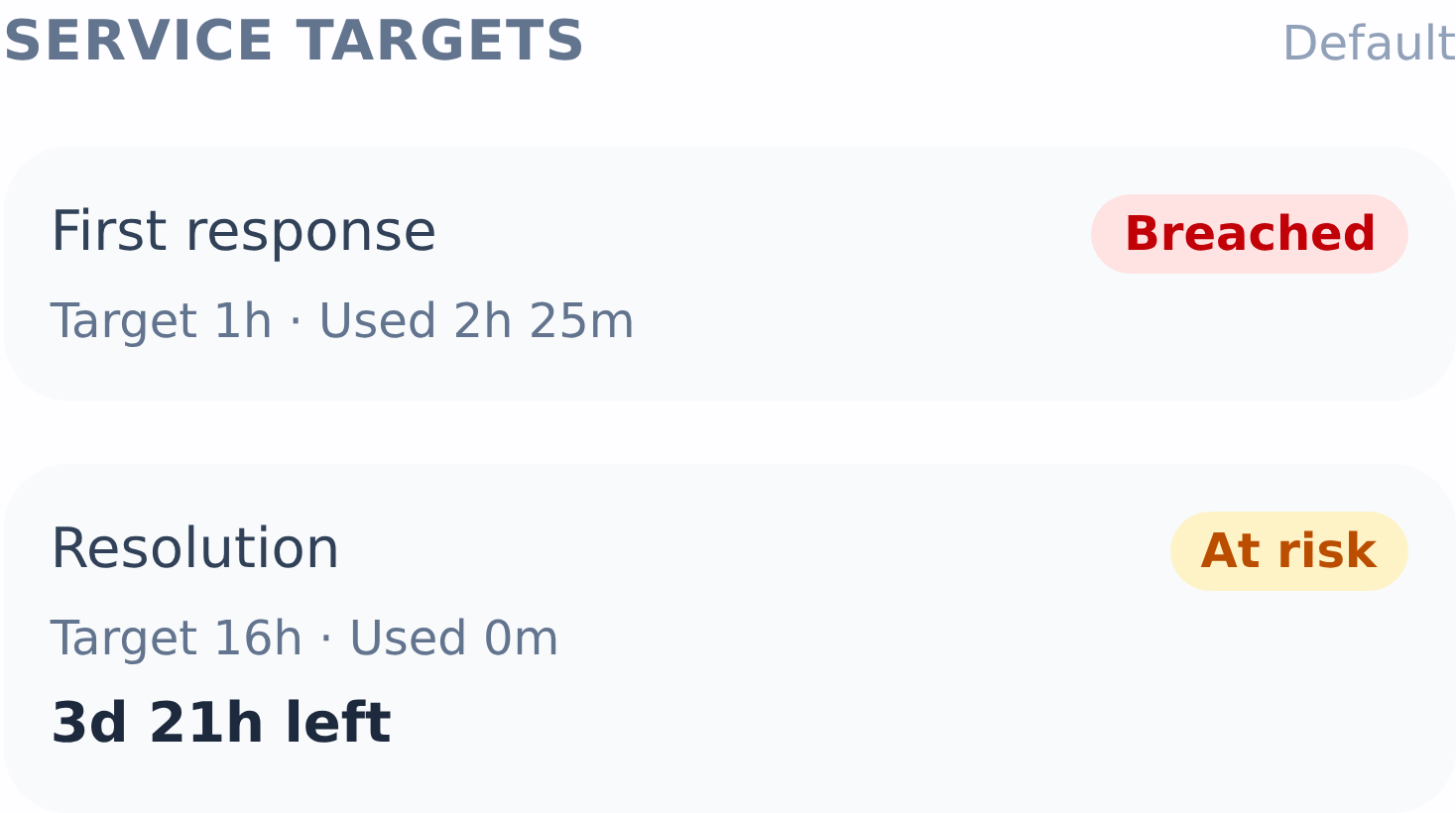
Set a first-response and a resolution target for each priority, your weekly opening hours, time zone and closure days. Clocks skip evenings, weekends and holidays, and the resolution clock pauses while you wait on the customer.
Setting service targets -
At risk before breached
A case turns at risk once 75% of a target is used and breached when it runs out. The owner is alerted in the app and by email, Admins and Agents hear about breaches and about unowned urgent cases, and a morning digest lists anything still breaching.
At-risk and breach alerts -
A case page for the customer
Invite a contact and they get a link to their case: no account, no password. They can read the conversation, reply, attach photos or documents, mark it resolved or reopen it. You can see when they last looked.
Inviting a customer to a case -
Queues and a dashboard
Tabs for Active, New, My Open, Waiting and Closed. With targets on, add Breached, At risk, due-soon, Unassigned, Urgent/High, waiting-on-us and stale queues, a count dashboard and a CSV of the figures.
Working from the queues -
Part of the customer record
A case links to one customer or one supplier, sits on their record beside quotes and invoices, and can have projects linked to it. Agents can triage cases from a phone-sized view too.
Cases on the customer record
How it works
A building fault, from report to close
A facilities management firm looks after shared areas in office blocks for several managing agents. This is how one urgent fault moves through its service desk.
-
The call comes in.
A building manager rings at 10:15 on a Tuesday: the passenger lift is stuck on the ground floor. The coordinator logs a new case against that managing agent, picks the primary contact, sets the category to Lift fault (one the firm added to the starter list) and the priority to Urgent. It becomes CS-00318.
-
Someone owns it.
The coordinator assigns the case to the engineer manager, who gets a notification. Had nobody been assigned, the firm's Admins and Agents would have been alerted straight away because the case is urgent and unowned.
-
The clocks start.
The firm's targets for Urgent are 30 business minutes to respond and four business hours to resolve, counted against its Monday to Friday, 8:00 to 18:00 calendar. The case page shows both clocks counting down.
-
First reply, then a wait.
The manager replies from the case asking when an engineer can get access to the lift motor room. That reply is emailed with a link to the case page, stops the response clock, and moves the case to Waiting on Customer, which pauses the resolution clock.
-
The customer answers on the case page.
The building manager opens the link, replies with an access time and attaches a photo of the lift panel. The case moves to Waiting on Internal and the resolution clock carries on from where it stopped.
-
A warning before the deadline.
The repair needs a part. Once three quarters of the resolution time is used, the case goes at risk and the owner gets an alert, so the manager can update the customer before the target is missed rather than after.
-
Resolve, then close.
The engineer fits the part. The manager resolves the case with a short summary; the customer is emailed that it's resolved and told they can reopen it from their link. A week later, with no comeback, the case is closed and the link stops working.
Meanwhile, routine reports such as a flickering stairwell light arrive at the firm's support mailbox. Each one opens its own case, with the sender linked if they are already a contact, and is measured against the same targets.
What it doesn't do
Plain limits, so you can decide quickly
Beagle's service desk is built for a small team handling customer problems well. It is not an enterprise IT service-management suite.
- Customers can't open new cases on the case page. They reply to, resolve or reopen cases you've invited them to. New problems come in by email, or your team logs them.
- No satisfaction surveys. Beagle doesn't send a rating request when a case is resolved.
- No merging, canned replies or automatic routing rules. Duplicate cases are closed by hand, replies are written each time, and owners are assigned by a person.
- Targets aren't shown to customers. The clocks are for your team; the customer's case page shows the status and the conversation, not a deadline.
- One opening window per day. Each weekday is open once, from a start to a finish time, or closed. Split shifts can't be entered.
- Reporting is about targets, not trends. The dashboard and CSV cover the measured queues and breach counts. There is no report of case volume by category or month.
- Switching targets on doesn't back-date. Cases that already exist are left unmeasured, so turning it on never invents old breaches.
- No engineer scheduling or dispatch. A case records the work; it doesn't plan routes or book visits.
Pricing
One plan, every feature
£29 per user per month, or £290 per user per year (two months free)
The service desk, service targets and the customer case page are all in the one plan. Every feature is included and there are no add-ons.
All prices exclude VAT.
Questions, answered
Frequently asked questions
- How are support cases numbered?
- Each organisation has its own sequence, starting at CS-00001. The reference appears on the case, in the case list and in square brackets at the start of every email subject about that case, so customers and staff can quote it.
- Can I set different response times for different priorities?
- Yes. Each of the four priorities has its own first-response and its own resolution target, in business minutes. Changing a case's priority moves it onto that priority's targets, but a breach that has already happened stays on record.
- What happens to the SLA clock when we're waiting for the customer?
- Putting a case into Waiting on Customer pauses the resolution clock, and sending them a reply does that automatically. When they answer by email or on their case page, the case moves to Waiting on Internal and the clock runs again.
- Do bank holidays count against our targets?
- No. Add closure days, such as bank holidays or a Christmas shutdown, alongside your weekly opening hours and time zone. Clocks only count time when you're open.
- Do customers need an account to follow their case?
- No. Send a contact a link from the case and they can read the conversation, reply, attach files and mark it resolved. You can withdraw a link at any time, and every link stops working once the case is closed.
- Who can work on cases?
- Admins and Agents can create, update, reply to, resolve, close and delete cases, and invite customers to them. Viewers can read cases but not change them. Only Admins can switch service targets on or change them.
Related
- CRM for service businesses Win the work, deliver it as a project and support the customer after, in one CRM. Service desk with SLA clocks, customer project portals and time logging.
- Shared inbox CRM One team inbox for sales@ and support@, with every email linked to the customer who sent it. Reply from your own mailbox; support email becomes a case.
- CRM for small businesses One CRM for a small UK team: leads, customers, quotes, VAT invoices, a shared inbox and a service desk. £29 per user, every feature, 14-day free trial.
- Lead management Track every lead on a drag-and-drop pipeline, with a next step and due date on each one. Beagle CRM flags stalled deals. £29 per user, 14-day free trial.
- Project management Run client projects in phases, with tasks on a board and a Gantt chart, blockers, time against estimates and project files. £29 per user, 14-day trial.
- Customer portal Let clients follow their project, approve work, upload files, accept quotes and reply to support cases in a portal with your logo. No passwords to manage.
- CRM reporting See pipeline, revenue, aged debt, product margins and a 12-month sales forecast on one reports page, with CSV exports. £29 per user, 14-day free trial.
Know which customer has waited longest, every morning
Try the service desk free for 14 days with no card, or book a demo and we'll set up your opening hours and targets with you.