
Quote to cash
Quotes, invoices and CRM in one place
Most small businesses keep their customers in one place, their quotes in another and their invoices in a third. Every hand-off between them is a chance to re-type a price, miss a follow-up, or forget to invoice work you've already done.
Beagle CRM runs the whole journey from first enquiry to paid invoice on one record, so the quote you send is the order you confirm and the invoice you raise.
14-day free trial with every feature. No card required.
The problem
Where quote-to-cash usually breaks
-
The quote lives in a document folder.
Nobody can see which quotes are waiting, which have been opened, and which have gone quiet.
-
Winning the job means starting again.
The accepted quote gets re-typed into an order, then again into an invoice, and each copy is a chance to get a line wrong.
-
Invoices go out late, or not at all.
When the work is finished, nothing prompts anyone to bill it.
-
Chasing is guesswork.
You can't see what's overdue, or when the customer was last reminded, without opening the accounts.
How it works
From enquiry to paid, on one record
Take an electrical contractor asked to price the rewiring and relighting of an office. Here is that job in Beagle CRM, from the first email to the money in the bank.
-
The enquiry becomes a lead.
The office manager's email is logged as a lead against their company, with an estimated value and a next step, so the job is in the pipeline before anyone has picked up a calculator.
-
You quote from the lead.
The quotation starts with the customer, contact and lead already filled in. Add the light fittings from your product catalogue at their preset prices, type free-text lines for the labour, and give any line a percentage or fixed-amount discount. VAT is added automatically if you're VAT-registered.
-
You send it and see when it's opened.
Send Email sends the PDF and marks the quote Sent. When the customer opens it, the quote moves to Viewed on its own, so you know when a follow-up call will land.
Optional: if you've invited the customer to their project portal, they can accept or decline the quote there, with a comment.
-
Winning it raises the order.
Mark as Won creates a confirmed sales order and emails the customer an order confirmation. There's no re-typing and no separate convert step. A lost quote records a reason, so you can see why work slips away.
-
The order becomes an invoice in one click.
When the job is done, Convert to Invoice copies the order's lines, prices and billing details into a draft invoice ready to send. The quote, the order and the invoice all link to each other, so anyone can trace the job from start to finish.
-
You get paid, and you can see it.
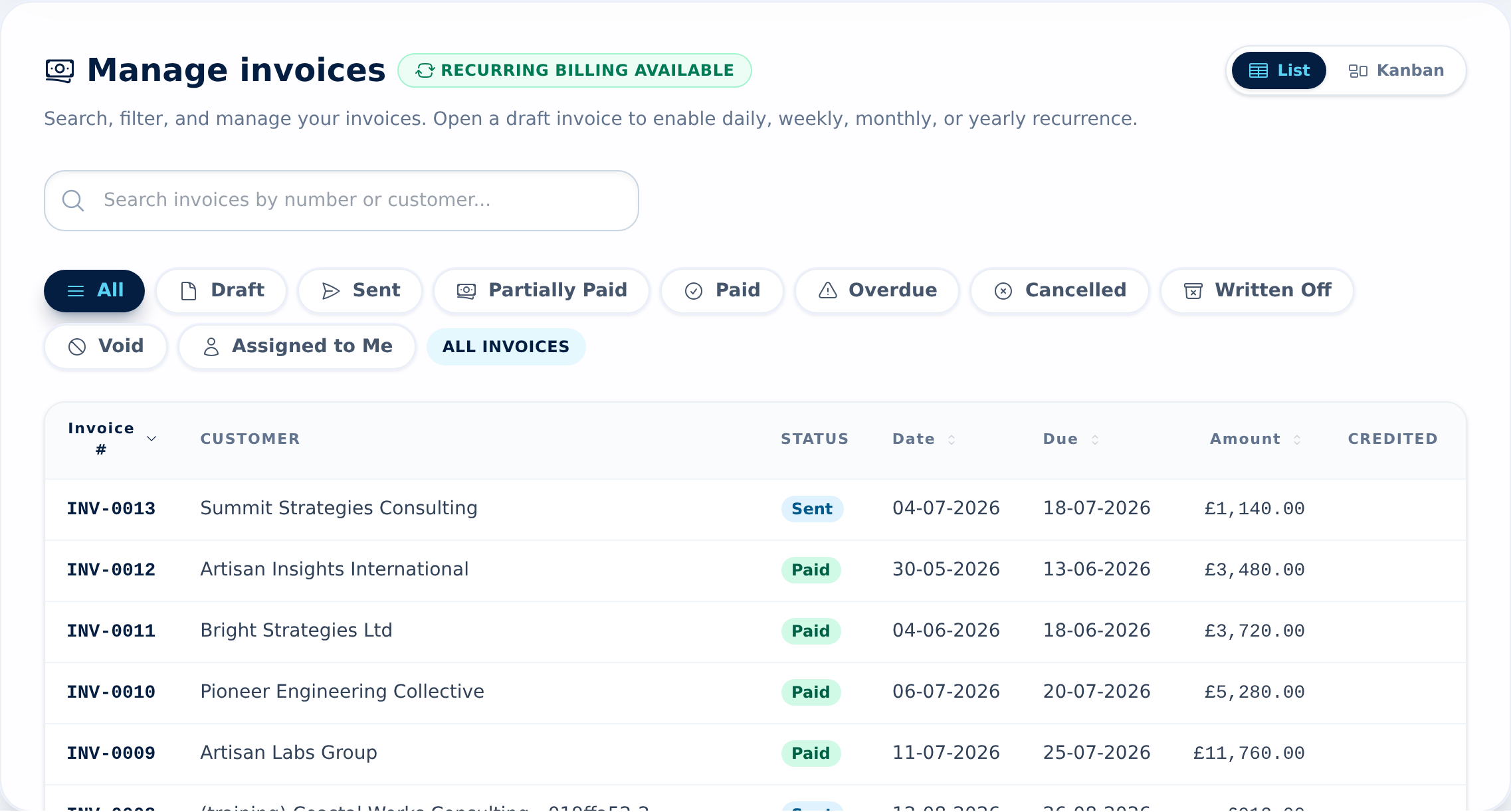
Email the invoice with a Pay this invoice online button (card payments go straight to your own Stripe account), record part or full payments by hand, and send reminders from the invoice with the reminder history kept. Overdue invoices have their own filter, so chasing starts from a list rather than a hunch.
What's included
Everything between "can you quote me?" and "paid"
-
Quotations
Catalogue or free-text lines, per-line discounts, automatic VAT, valid-until dates, a PDF, open tracking, and revisions that keep the sent history.
How quotations work -
Sales orders
Raised automatically when a quote is won, with a clear status path to invoiced and completed.
How sales orders work -
VAT invoices
From an order, from a quote, or standalone, with your own numbering, payment terms and terms of sale.
How invoices work -
Online card payments
A pay link in every invoice email and reminder. The money goes to your Stripe account and Beagle takes no cut.
How online payments work -
Recurring invoices
Repeat daily, weekly, monthly or yearly, with an optional end date and automatic sending.
How recurring invoices work -
Credit notes
Full, by line or a custom amount, as a refund or as credit on the customer's account.
How credit notes work -
Stock that follows the sale
With the Purchasing module, invoicing an order takes stock-tracked products out of stock automatically.
How orders and stock work
Works with Xero
Keep your books in step without re-keying
Connect Xero and issued invoices and credit notes are sent to your ledger under the same invoice number, so the two systems reconcile by eye. The customer is matched to an existing Xero contact by exact email or name, or created if there isn't one. Nothing is merged on a guess. Payments you record in Xero come back to the Beagle invoice every hour, so everyone can see what's been paid.
Drafts never reach Xero, and a line whose VAT treatment you haven't mapped stops with a message telling you what to fix, rather than posting a guess into your VAT return.
Pricing
One plan, every feature
£29 per user per month, or £290 per user per year (two months free)
Quotes, orders, invoices, online payments and the Xero connection are all included, with no add-ons and no per-feature tiers.
All prices exclude VAT.
Questions, answered
Frequently asked questions
- Can I turn an accepted quote into an invoice without re-typing it?
- Yes. Marking a quote as won creates a confirmed sales order, and Convert to Invoice on that order copies its lines, prices and billing details into a draft invoice. You can also invoice a won quote directly.
- Does Beagle CRM handle VAT on quotes and invoices?
- Yes. If your organisation has a VAT number, VAT is added automatically to quotations and invoices, and credit notes carry their own VAT. Quote and invoice numbers follow the prefixes you set in Organisation Settings.
- Can customers pay an invoice online?
- Yes, by card, from a link in the invoice email and in every reminder. Payments go straight to your own Stripe account, Beagle takes no cut, and the invoice is marked paid when the payment clears.
- Will I know when a customer has read my quote?
- Usually. A quote moves to Viewed when the customer opens the quotation email. It relies on images loading, so treat it as a good sign rather than a guarantee: a customer whose email blocks images can read the quote without it ever showing as Viewed.
- Does it work with Xero?
- Yes. Issued invoices and credit notes are sent to Xero under the same invoice number, and payments recorded in Xero come back to Beagle every hour. Drafts are never sent.
- Can I set up recurring invoices?
- Yes. Turn any draft invoice into a recurring one, repeating daily, weekly, monthly or yearly, with an optional end date or occurrence limit and automatic sending.
Related
- CRM with Xero Quote and invoice in Beagle CRM; issued invoices and credit notes post to Xero under the same number, and Xero payments flow back every hour.
- CRM for small businesses One CRM for a small UK team: leads, customers, quotes, VAT invoices, a shared inbox and a service desk. £29 per user, every feature, 14-day free trial.
- Quoting software Build quotes from your catalogue, discount any line, email a PDF with your logo and see when the customer opens it. Quoting software for UK businesses.
- VAT invoicing Invoice with VAT set per line, your VAT number on each PDF, card pay links, part payments, credit notes and CSV exports. Built for UK small businesses.
- Recurring billing Turn any invoice into a weekly, monthly or yearly series. Each repeat gets its own number and dates, ready to check and send with a card pay link.
Send your next quote from Beagle
Start a 14-day free trial with every feature and no card required, or book a demo and we'll walk through your quote-to-invoice process with you.