
Shared inbox
A shared inbox that knows your customers
When three people answer the same sales@ address from their own email apps, nobody knows who replied, and the customer's history ends up spread across a dozen separate inboxes.
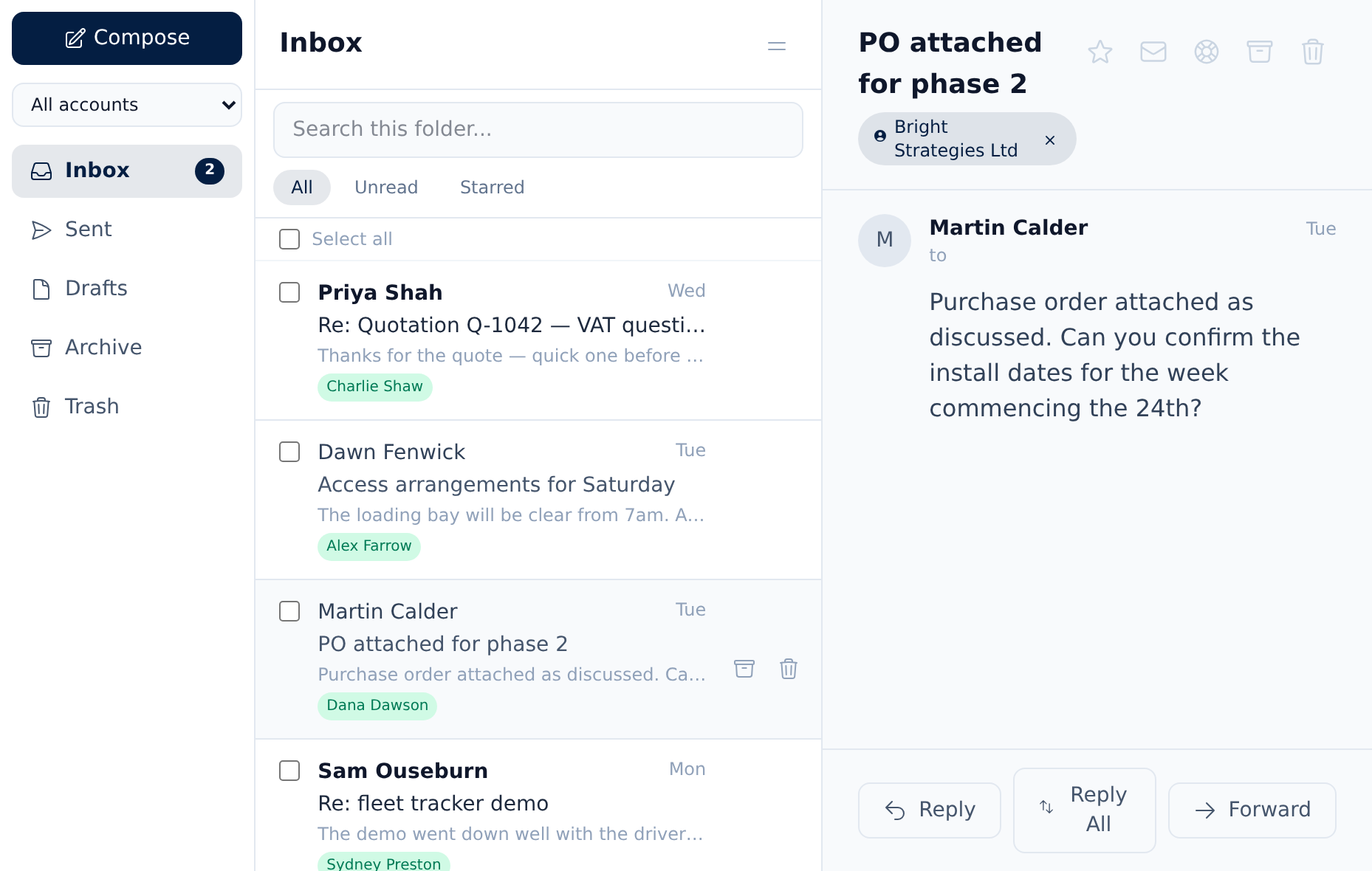
Beagle CRM brings your shared mailboxes into one team inbox inside the CRM. Every email is filed against the customer or contact who sent it, the whole team can read it, and replies go out from your own mailbox.
14-day free trial with every feature. No card required.
The problem
Where shared email goes wrong
-
Nobody knows who replied.
The customer gets two answers, or none, because each person works from a private copy of the mailbox.
-
History is split across inboxes.
What was promised in an email never reaches the customer record, so the next person starts from scratch.
-
Support requests get lost in sales mail.
A complaint sits in the same pile as a new enquiry, and waits.
-
Follow-ups rely on memory.
An email gets read on a phone between jobs, then forgotten.
How it works
One team inbox, filed against your customers
-
Connect the mailboxes you use
Microsoft 365 with a Microsoft sign-in, Google Workspace after a short one-off setup, or any provider with IMAP and SMTP. Send-only accounts suit providers without IMAP.
How to connect a mailbox -
One inbox for the whole team
Every mailbox belongs to the organisation, so sales@ and support@ are visible to everyone, with read and starred shared across the team.
How the team inbox works -
Filed against the right record
Mail is matched by address to the customer or contact who sent it, and to their newest open lead. Unknown senders become customers in one click.
How customer records work -
Reply from the CRM
Reply, reply all, forward or compose, with CC and BCC. Mail goes out through your own mailbox, threaded with the conversation.
Replying from the inbox -
Support mail becomes cases
Mark a mailbox as support and each new email opens a service-desk case, with replies added to the same case. Any email can become a case by hand.
Delivery and support in Beagle -
A follow-up for every customer email
When an email arrives from a known customer, Beagle creates a follow-up task due that day, so nothing is read and forgotten.
How tasks work
In practice
A morning in the team inbox
-
A customer asks for a price.
An existing customer emails sales@ asking about extra work. It lands in the team inbox already filed against their record and their open lead, with a follow-up task due today.
-
Anyone can see it; the right person answers.
A manager replies from Beagle, through the sales@ mailbox. The reply sits on the customer's record, so the rest of the team knows it's been handled.
-
A fault report becomes a case.
Another customer emails support@ about a problem. Because that's a support mailbox, a service-desk case opens straight away, with its response target running if you use service targets.
-
The conversation stays together.
The customer's reply to the case email goes into the same case, not a new thread.
Roles
Who can do what
Everyone in your organisation can read the team inbox. Admins and managers send, reply, archive and turn emails into cases, so customers hear from the people responsible for them.
Clear edges
What the inbox doesn't do yet
The inbox syncs each mailbox's main inbox folder every minute. Mail you send from other email apps, and other folders, stay in those apps. There are no email signatures, attachments on outgoing mail or calendar sync yet.
Pricing
One plan, every feature
£29 per user per month, or £290 per user per year (two months free)
The shared inbox is in the one plan, for every user.
All prices exclude VAT.
Questions, answered
Frequently asked questions
- Which email providers work with the shared inbox?
- Microsoft 365, Google Workspace and any provider that offers IMAP and SMTP. Microsoft 365 connects with a Microsoft sign-in. Google needs an admin to register your organisation's Google sign-in app first, which takes about ten minutes with our guide.
- Can several people work from one sales@ or support@ address?
- Yes. Every connected mailbox belongs to the organisation, so the whole team sees the same inbox. Read and starred status are shared, so everyone can see what's been dealt with.
- How are emails linked to customers?
- By email address. Incoming mail is matched to the customer or contact who sent it, and to that customer's newest open lead. If the sender isn't in Beagle yet, you can create them as a customer from the email.
- Do replies come from our own email address?
- Yes. Replies and new emails are sent through the mailbox you connected, so customers see your normal address and the reply is threaded with the conversation.
- Can emails become support cases?
- Yes. Mark a mailbox as a support mailbox and every new email opens a service-desk case, with later replies added to the same case. You can also turn any single email into a case.
- Who can send email from the inbox?
- Everyone can read the inbox. Admins and managers can send, reply, archive and turn emails into cases.
Related
- CRM for small businesses One CRM for a small UK team: leads, customers, quotes, VAT invoices, a shared inbox and a service desk. £29 per user, every feature, 14-day free trial.
- CRM for service businesses Win the work, deliver it as a project and support the customer after, in one CRM. Service desk with SLA clocks, customer project portals and time logging.
- Quotes, invoices & CRM Quote, win, invoice and get paid without re-keying a line. Beagle CRM links every UK quote, sales order and VAT invoice to the customer who asked for it.
- CRM with Microsoft 365 Connect Microsoft 365 mailboxes to Beagle CRM with a Microsoft sign-in. Mail is read each minute, filed to customers, and replies go from your own address.
- CRM with Google Workspace Connect Google Workspace mailboxes to Beagle CRM. Gmail is read and sent from inside the CRM, filed against the right customer, via a Google app you own.
Bring your team's email into one place
Start a 14-day free trial with every feature and no card required, or book a demo and we'll connect a mailbox with you.